South African manufacturers often have strong design tools but weak operational control between engineering and production, leading to delays and rework.
SOLIDWORKS Manage extends PDM Professional with project, process, item, and BOM management rather than replacing familiar tools.
The platform covers file management, project tracking, process automation, BOM accuracy, and real-time dashboards and reporting.
Because it sits inside the existing SOLIDWORKS environment, training time and implementation cost are significantly lower than standalone enterprise PLM platforms.
The payoff is operational: fewer production delays, reduced rework, better procurement planning, and faster internal decisions without a disruptive system change.

MECAD Systems
South African manufacturers running advanced production environments are dealing with a consistent issue: strong engineering capability on one side, and unreliable execution conditions on the other. Between those sits the “missing middle” – where design intent breaks down into delays, version confusion, and avoidable production costs.
This is not usually a design problem. It is a control problem.
SOLIDWORKS Manage addresses this by extending the SOLIDWORKS environment into structured operational management. For teams already using SOLIDWORKS, this is important: it does not replace their tools or force a new ecosystem. It builds on what engineers already know, reducing training time and implementation friction compared to enterprise systems like Teamcenter or Windchill.
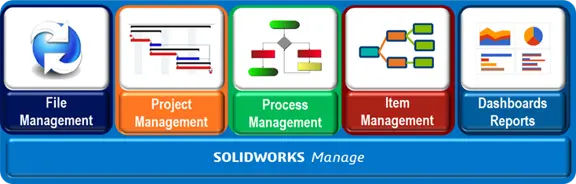
SOLIDWORKS Manage can be understood through five core pillars that reflect how manufacturing teams actually operate day to day.
SOLIDWORKS Manage is the next step up from SOLIDWORKS PDM Professional. It works alongside PDM, extending its capabilities with project, process, item, and BOM management, while supporting file access, check-in and check-out, SOLIDWORKS integration, workflows, and process management.
Key points:
SOLIDWORKS Manage helps teams plan and track projects from start to finish while staying connected to CAD files and design data. Manage stages, timelines, milestones, tasks, timesheets, deliverables, and resource capacity, all within the same engineering environment.
This gives project managers and engineering teams a clear view of progress, responsibilities, and project status.
Key points:
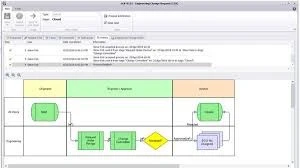
SOLIDWORKS Manage helps teams control repeatable business processes, from engineering changes and approvals to procurement and asset management. Using swim lane management, you can map workflows, assign responsibilities, and keep every step connected.
Processes can also trigger projects, CAD workflows, and other processes, creating a connected, automated system.
Key points:
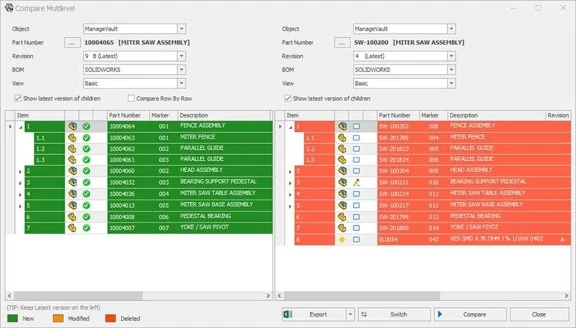
SOLIDWORKS Manage supports BOM management for both CAD and non-CAD items, allowing you to build complete product definitions that include bought-out parts, consumables, documents, and more. It also supports fractional quantities, making it ideal for measured materials.
Key points:
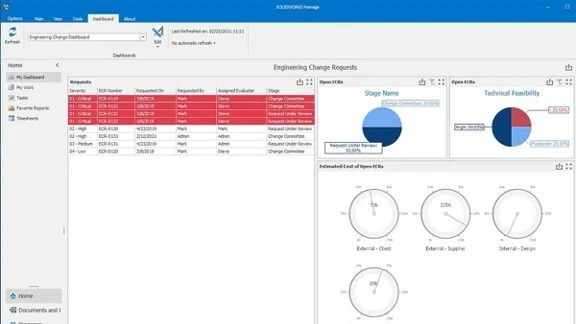
SOLIDWORKS Manage lets you create reports from any data captured in the system. Generate customer-ready Word or PDF documents covering projects, tasks, milestones, or processes, and share them with your team or customers.
Key points:
Manufacturers operating in complex production environments are not just looking for better design tools. They are looking for stability in execution.
Most inefficiencies come from internal disconnects rather than engineering capability. These include:
SOLIDWORKS Manage addresses these issues by creating structure around how engineering data moves through the organisation, without forcing teams to abandon the SOLIDWORKS environment they already know.
The key advantage is upskilling efficiency. Because engineers already understand SOLIDWORKS, the learning curve for Manage is significantly lower than adopting external PLM platforms. This reduces training time, accelerates deployment, and lowers overall cost of ownership.
The missing middle in manufacturing is not a technology gap; it is an operational control gap between engineering and execution.
SOLIDWORKS Manage strengthens this layer by introducing five structured pillars: file management, project management, process control, BOM accuracy, and operational dashboards.
For South African manufacturers with advanced production facilities, the value is practical rather than theoretical: fewer production delays, reduced rework, improved procurement planning, and faster internal decision-making without introducing a completely new software ecosystem.
It is not about replacing existing systems. It is about making the SOLIDWORKS environment already in place more operationally powerful, with less disruption and lower training overhead than traditional enterprise PLM solutions.
If your team is already running SOLIDWORKS and you’re dealing with the disconnects, SOLIDWORKS Manage could be the missing layer. Contact MECAD Systems to discuss your current setup, or request a demo to see how Manage fits into your existing PDM environment.
Share this post: