
 Trusted by millions of engineers and designers worldwide
SOLIDWORKS Flow Simulation is powerful Computational Fluid Dynamics (CFD) software that lets designers and engineers analyse how gases and liquids flow in and around their designs. Simulate fluid flow, heat transfer, and fluid forces directly inside SOLIDWORKS Design – and make smarter, data-driven decisions earlier in the design process.
SOLIDWORKS Flow Simulation is a general-purpose CFD tool fully embedded within SOLIDWORKS Design. It allows engineers to simulate how liquids and gases behave inside or around their products – including fluid flow, heat transfer, and related forces. Because it runs directly inside SOLIDWORKS, you can set up, solve, and review CFD results without leaving the design environment or exporting files to other software.
The tool supports a wide range of studies, from basic airflow checks to complex thermal and multiphase analysis. Engineers can run what-if scenarios to compare design variations, test different configurations, and make data-driven optimisations – all before building a physical prototype. SOLIDWORKS Flow Simulation can also be extended with two add-on modules for HVAC and Electronics Cooling applications.
Key capabilities include:
SOLIDWORKS Flow Simulation helps teams predict real-world performance, reduce physical prototyping, and make better design decisions – all from within the SOLIDWORKS Design environment.
SOLIDWORKS Flow Simulation provides a wide range of CFD tools for testing fluid flow, heat transfer, and related physical effects during product design. Capabilities can be extended with optional add-on modules for HVAC and Electronics Cooling applications.
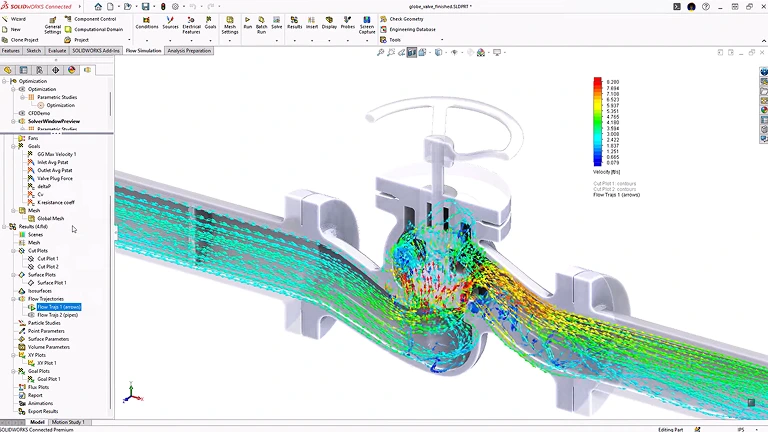
SOLIDWORKS Flow Simulation runs directly inside the SOLIDWORKS Design environment. You can set up, solve, and review CFD results without leaving the interface. The simulation is parametrically linked with native SOLIDWORKS CAD data – so no geometry transfer is needed, and your design configurations are automatically reflected in Flow Simulation studies. Built-in optimisation tools let you automatically test multiple design iterations and find the best-performing option.
Key points:
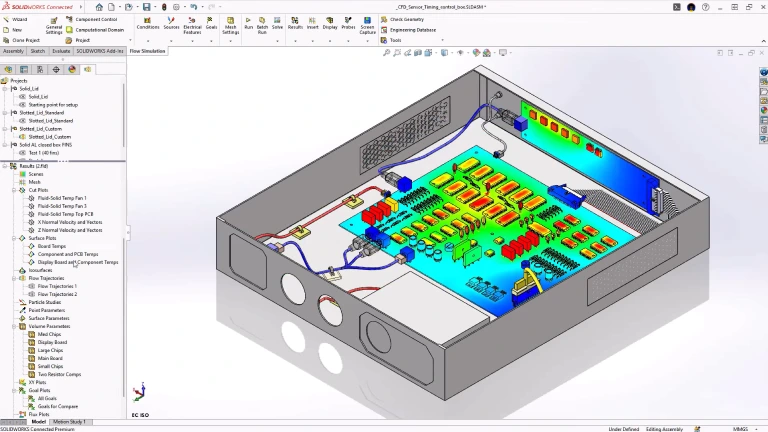
SOLIDWORKS Flow Simulation includes a built-in Analysis Wizard that guides you through setting up all types of studies. The software automatically identifies the fluid region based on your analysis type, reducing the need to manually define fluid volumes. Proprietary partial-cell meshing technology minimises geometry cleanup and preparation time, while built-in geometry checks and leak-detection tools help identify gaps or problem areas before running an analysis.
Key points:
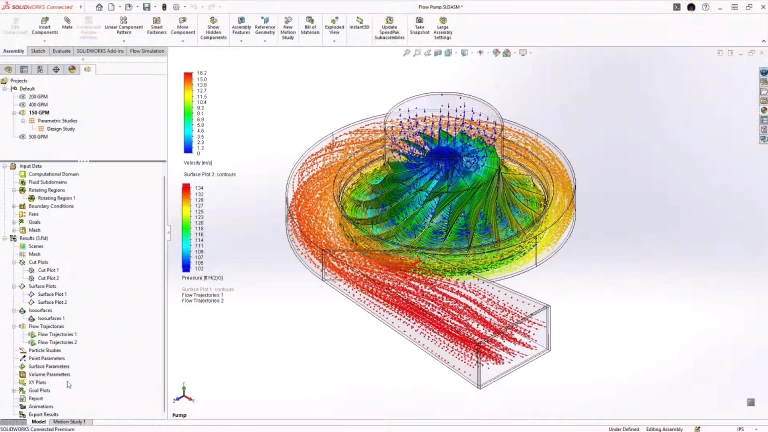
Simulate the full range of fluid behaviour – from basic airflow to complex multiphase, thermal, and high-speed conditions. SOLIDWORKS Flow Simulation supports internal and external flows, steady-state and transient analysis, conjugate heat transfer, rotating equipment, free surface tracking, porous media, and noise prediction. Engineers can work with liquids, gases, non-Newtonian fluids, compressible flows, and subsonic through supersonic gas conditions.
Key points:
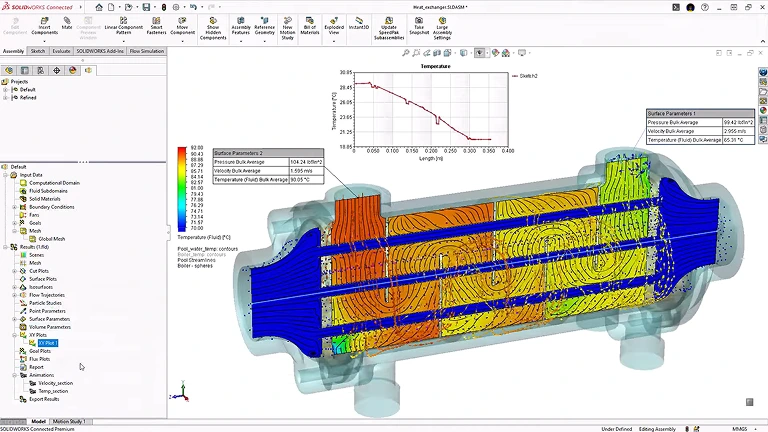
Extend SOLIDWORKS Flow Simulation with two optional add-on modules for industry-specific applications. The HVAC Module lets you evaluate comfort parameters such as local air quality index (LAQI), percentage of dissatisfied (PPD), and predicted mean vote (PMV), along with advanced radiation and tracer studies. The Electronics Cooling Module lets you test Joule heating, heat pipes, two-resistor components, fans, and includes a PCB board generator to optimise thermal performance of electronic products.
Key points:
SOLIDWORKS Flow Simulation is available as a base product with two optional add-on modules for specific industries. Which package you need depends on the type of flow and thermal analysis your team performs.
See how engineering teams use SOLIDWORKS Flow Simulation to test flow behaviour, improve cooling performance, and cut down on physical testing. Our SOLIDWORKS Customer stories show real-world examples of how CFD-based decisions help teams get better results – from early design through to production.


If you are looking at SOLIDWORKS Flow Simulation for fluid flow analysis, cooling design, or thermal testing, MECAD Systems can help you find the right package and setup for your team.
Our specialists will take the time to understand your design process, engineering challenges, and analysis needs – so you end up with the right CFD solution for your workflow.
SOLIDWORKS Flow Simulation is a fluid flow analysis tool. It lets engineers and designers test how liquids and gases behave inside or around their products – before building a physical prototype.
To run a study, you set up conditions like fluid type, inlet speed, pressure, and temperature. The software then calculates how the fluid moves through or around your design, and shows results like flow speed, pressure, temperature, and flow paths. This helps teams find problems – such as blocked airflow, overheating, or pressure loss – and fix them during the design phase, saving time and money.
Without simulation, teams often need to build several physical prototypes to test how fluids flow, how well cooling works, and where pressure builds up. SOLIDWORKS Flow Simulation lets engineers run these same tests on their 3D models – virtually. By finding problems like poor airflow, overheating, or pressure loss during the design phase, teams can make fixes before any parts are manufactured. This means fewer prototype rounds, lower material costs, and shorter development timelines.
SOLIDWORKS Flow Simulation is the core product. It handles internal and external flow analysis, heat transfer, rotating equipment, free surface modelling, and design studies.
The HVAC Module is an optional add-on that builds on top of Flow Simulation. It adds tools made specifically for heating, ventilation, and air conditioning work – including advanced radiation modelling for materials like glass, tracer studies for tracking pollutants and contaminants, human comfort measurements (such as temperature comfort and draft), air quality indices, and an expanded database of HVAC components and building materials.
The Electronics Cooling Module is an optional add-on for Flow Simulation, built for engineers who design electronic products. It adds tools for modelling printed circuit boards (PCBs) with realistic heat flow, chip package representations, heat pipes, thermoelectric coolers, and the heat generated by electric current (Joule heating). It also comes with an expanded database of thermal data for common electronic parts. This module is a good fit for teams working on thermal management for devices like servers, consumer electronics, or any product where keeping components cool is critical.
No. SOLIDWORKS Flow Simulation is designed for everyday engineers and designers who already work in SOLIDWORKS. A step-by-step setup wizard guides you through the process of defining your fluid, setting boundary conditions, and choosing what results to track. The software handles meshing and turbulence modelling automatically. While knowing the basics of fluid flow and heat transfer will help you read results more confidently, you do not need specialist CFD training to get started.
Yes. You can send pressure and temperature results from Flow Simulation directly into SOLIDWORKS Simulation for structural analysis. This lets you see how fluid forces and heat affect the strength and shape of your parts. For example, if a pipe carries hot, pressurised fluid, you can first simulate the flow to get temperature and pressure data, then use that data to check whether the pipe can handle the load. This is especially useful for pressure vessels, heat exchangers, and piping systems.
Flow Simulation works with many different fluid types, including regular gases (like air), real gases, standard liquids (like water), compressible liquids, non-Newtonian fluids (like oil, blood, or sauce), and steam. The software comes with a built-in database of common fluids, and you can add your own custom fluids if needed. It also supports studies that involve more than one type of fluid at the same time.
SOLIDWORKS Flow Simulation is used across many industries. Common examples include automotive (aerodynamics, engine cooling, cabin airflow), electronics (thermal management, device cooling), industrial equipment (pumps, valves, compressors), consumer products (appliance airflow, heating), HVAC and building services (duct design, indoor comfort), aerospace (aerodynamics, internal cooling), and medical devices (fluid delivery, equipment cooling). Any product where fluid flow, airflow, or heat transfer matters can benefit from this tool.
Yes. SOLIDWORKS Flow Simulation needs its own licence on top of a SOLIDWORKS CAD licence. It works with all levels of SOLIDWORKS – Standard, Professional, and Premium. The HVAC Module and Electronics Cooling Module are additional add-ons that require Flow Simulation as a starting point. Flow Simulation is available as a perpetual licence (with a subscription for updates and support) or as a term licence (paid on a set schedule). Contact MECAD Systems for pricing and licensing details.
SOLIDWORKS Flow Simulation gives engineering teams the tools to test fluid flow, heat transfer, and fluid forces during the design process. Whether you need to check airflow through a housing, manage heat in an electronic device, or test aerodynamic performance, Flow Simulation helps you make better design decisions – while cutting down on costly physical prototypes.