Our SOLIDWORKS demo is a personalised walkthrough led by a certified specialist, not a self-service trial.
Your demonstration can cover core 3D CAD capabilities and, where relevant, additional tools such as simulation, rendering, data management or manufacturing.
Your specialist helps you understand Standard, Professional, Premium, so you don't overspend or underbuy.
Fill in the contact form on our SOLIDWORKS Design page and a specialist schedules a session at your convenience.
We handle licensing, training, implementation, and ongoing technical support from a single point of contact.
Choosing a 3D CAD platform is one of the most significant technology decisions an engineering team will make. You can read product pages, compare spec sheets, and watch videos online, but none of that replaces seeing the software applied to your actual design challenges.
That’s where a free SOLIDWORKS demo comes in. Instead of figuring things out on your own, you get a guided walkthrough from someone who knows the software inside out. You’ll see how SOLIDWORKS handles parametric modelling, assemblies, drawings, simulation, and rendering, all within the context of your industry and workflow.
This article explains what to expect from a SOLIDWORKS demonstration, how to prepare for your session and how to request one through MECAD Systems in South Africa.
A free SOLIDWORKS demo is a guided, no-obligation walkthrough of the software led by a certified specialist. The session focuses on the tools and workflows most relevant to your design and engineering needs, so you can evaluate SOLIDWORKS with confidence before making a purchase decision.
A SOLIDWORKS demonstration gives you the opportunity to see the software in action and discuss how its capabilities apply to your engineering environment. Depending on your requirements, the session may include live modelling, assembly workflows, drawing creation or demonstrations of specific tools relevant to your business. You can ask questions in real time, request to see particular tools, and get advice on which SOLIDWORKS package fits your team.
For teams evaluating a new CAD platform, a focused demonstration can help narrow down which capabilities are worth exploring further. You see what matters to your business first, rather than sifting through features you may never use. And because we’ve worked with over 2,700 active clients across South Africa, our team understands what SOLIDWORKS is used for in local industries from mining equipment to consumer products.
A typical demo covers 3D part and assembly modelling, technical drawing creation, simulation for stress and motion analysis, and photorealistic rendering with SOLIDWORKS Visualize. If you have specific needs like sheet metal, surfacing, or data management, your specialist can tailor the session to include those workflows too.
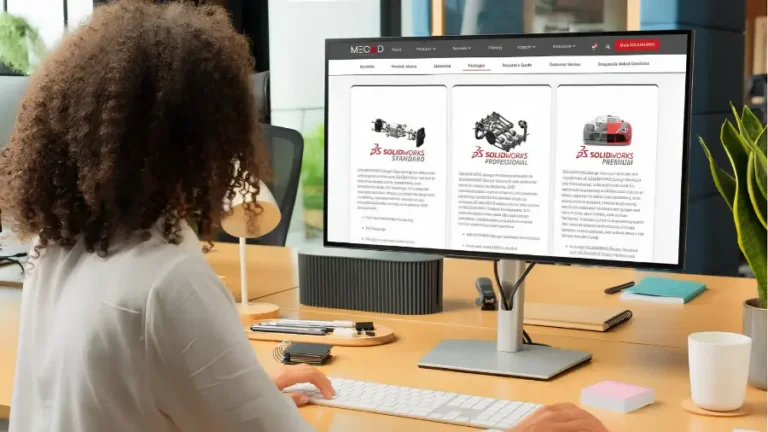
SOLIDWORKS offers different design packages and additional solutions depending on the level of functionality required. MECAD can help you compare the available options, from core 3D CAD through to advanced design, simulation and manufacturing workflows. Each tier builds on the one before it. Standard gives you core 3D CAD, assemblies, and drawings. Professional adds component libraries, rendering apps, and costing tools. Premium includes simulation for stress testing and motion analysis, plus advanced surface flattening.
During your demo, the specialist can show you features from any tier. This helps you understand exactly what you need and what you don’t. If you only require core 3D modelling, there’s no pressure to buy a Premium licence. If your team needs simulation, you’ll see it working on a real model before you commit.
SOLIDWORKS also bundles useful tools into its subscription services. Depending on the SOLIDWORKS package and subscription entitlements, additional capabilities such as SOLIDWORKS Visualize and SOLIDWORKS CAM may also be available. Your MECAD specialist can explain which tools are included in your proposed solution and which require separate licensing. Your demo can cover these too, so you know exactly what’s included in your investment.
A guided demonstration helps you identify the features and workflows most relevant to your business before investing time in a software evaluation. It also gives you an opportunity to ask technical questions, discuss compatibility with existing systems and understand which licensing options may suit your team.
Self-directed exploration has its place, but professional CAD software is complex. Dassault Systèmes themselves recommend working with a reseller partner who will talk to you about your business, your needs, and your plans for the future. A reseller puts together a proposal based on your actual requirements and schedules a demo in your office or online. That’s a fundamentally different experience from clicking through menus on your own.
There are practical benefits too. During a demo, you can ask questions like: “Can SOLIDWORKS open and work with files from our existing CAD system? ” or “How would we manage assemblies and drawings across multiple designers? ” You’ll get a live answer, often with a demonstration right there on screen. Compare that to spending hours reading help documentation to answer the same question.
For engineering managers evaluating CAD for a team, the demo also provides a chance to assess the learning curve. You can gauge how intuitive the interface is, how quickly a new user could get productive, and what training your team would need post-purchase.
The short answer: anyone making a decision about 3D CAD software. But some situations make a demo particularly valuable.
If you’re evaluating 3D CAD for the first time, a demo gives you a structured introduction rather than a steep learning curve. You’ll see how SOLIDWORKS approaches design from sketch to finished part, which helps you decide whether it suits your team’s workflow.
Teams considering a switch from another CAD platform benefit from seeing how SOLIDWORKS handles file imports, drawing standards, and day-to-day modelling tasks. Dassault Systèmes builds 3D Interconnect into SOLIDWORKS for working with files from other CAD systems, and your demo can show you how this works with your existing data.
If your business has outgrown basic 3D modelling and you’re looking at simulation, data management with PDM, or manufacturing tools, a demo helps you explore our full SOLIDWORKS product range without committing to an expanded licence upfront. You might discover that a Professional licence covers everything you need, or that Premium’s simulation tools will pay for themselves in reduced prototyping costs.
Requesting a SOLIDWORKS demonstration is straightforward. Visit the MECAD Systems SOLIDWORKS Design page and complete the enquiry form. A member of our team will contact you to discuss your requirements and arrange a suitable session.
To get the most out of your demo, come prepared. Think about the design challenges your team faces daily. Are you working with complex assemblies? Do you need to validate designs with simulation before prototyping? Are you producing technical drawings for manufacturing? The more context you give, the more relevant your demo will be.
It also helps to know your current setup. If you’re using another CAD tool, let the specialist know so they can address migration questions. If you’re starting from scratch, they’ll focus on onboarding and the basics of getting productive quickly.
Demonstrations can be arranged online, with in-person sessions considered depending on your location and requirements. MECAD Systems has offices in Gauteng, the Western Cape and KwaZulu-Natal, supporting customers across South Africa.
After your demo, our team helps you choose the right SOLIDWORKS package, provides a tailored quote, and supports you from purchase through to go-live and beyond. You won’t be left to figure out implementation on your own.
We offer SOLIDWORKS through several licensing options. You can purchase a term licence (monthly or yearly) or a perpetual licence, depending on your budget and business model. We’ll explain the trade-offs and help you pick the option that makes the most financial sense for your team.
After selecting the appropriate licence, MECAD can assist with implementation, onboarding and training based on your team’s existing experience and requirements. . We offer SOLIDWORKS training courses from Essentials through to Advanced and specialised topics like Simulation, Electrical, and PDM. Structured training gets your team productive faster than self-teaching. It also reduces the costly mistakes that come from learning on live projects.
You’ll also want to make sure your hardware is ready. We have a detailed guide to SOLIDWORKS system requirements that goes beyond the official minimums and recommends practical specs for real-world workloads.
Dassault Systèmes builds SOLIDWORKS to scale with your business. As the official buying guide explains, you can start with Standard and add capabilities as your needs grow. As your authorised reseller partner, we make that growth path easy to navigate, whether you need to add simulation licences or roll out PDM for your engineering team.
A SOLIDWORKS demonstration is an opportunity to see how the software could fit into your existing design and manufacturing processes before making a purchasing decision. By discussing your requirements with MECAD Systems, you can identify the capabilities worth evaluating and make a more informed choice.
Request your free SOLIDWORKS demo to discuss your requirements and arrange a session with our technical team.
Request your free SOLIDWORKS demo today and take the first step toward faster, more accurate product development.

Elite Applications Engineer BSc in Mechanical Engineering
Share this post: