
 Trusted by millions of engineers and designers worldwide
SOLIDWORKS Design gives engineers, designers and manufacturers access to professional SOLIDWORKS 3D CAD tools for creating accurate parts, assemblies, drawings and production-ready documentation. With powerful modelling capabilities, cloud-enabled collaboration and flexible licensing options, it supports every stage of product development.
SOLIDWORKS Design is a complete 3D CAD environment used to create parts, assemblies and detailed drawings. It supports daily engineering work by providing an intuitive interface, predictable modelling tools and built-in collaboration features that keep teams aligned.
You can sketch, model, review and prepare manufacturing documentation within one platform, with cloud-connected services simplifying feedback, sharing and version control.
Key capabilities include:
Powerful parametric modelling
Assembly design with performance-focused tools
2D and 3D manufacturing documentation
Assistive AI for modelling and drawing tasks
Connected cloud collaboration
CAD-aware file storage and version control
Integrated workflows with simulation, rendering and CAM
SOLIDWORKS Design gives teams a stable, efficient workflow that reduces rework and keeps projects moving forward. The tools are designed to support everyday engineering tasks without adding complexity.
Not every team needs the same tools. SOLIDWORKS Design comes in three packages – Standard, Professional, and Premium – each built on the same core 3D design platform, with more capabilities added at each level. Use the matrix below to see exactly what is included in each package, so you can choose the right fit for your team before you buy.
| Capability | SOLIDWORKS Design Standard | SOLIDWORKS Design Professional | SOLIDWORKS Design Premium |
|---|---|---|---|
| 3D Design and Modelling | |||
| Part and Assembly Modelling and 2D Drawings | ✓ | ✓ | ✓ |
| Specialised Design Tools for Weldments, Molds, and Sheet Metal | ✓ | ✓ | ✓ |
| Design and Manufacturability Checks | ✓ | ✓ | ✓ |
| ECAD-MCAD Collaboration | ✓ | ✓ | ✓ |
| Intelligent CAD Libraries of Industry-Standard Fasteners | — | ✓ | ✓ |
| Manufacturing Cost Analysis | — | ✓ | ✓ |
| CAD Standards and Drawings Checking | — | ✓ | ✓ |
| Electrical Harness, Piping, Tubing, Duct Design, and Surface Flattening | — | — | ✓ |
| AI Capabilities | |||
| Automatic Drawing Generation | ✓ | ✓ | ✓ |
| AI for 3D Modelling | ✓ | ✓ | ✓ |
| Integrated AI Companion | ✓ | ✓ | ✓ |
| Simulation | |||
| Linear Static Analysis for Parts and Assemblies | — | ✓ | ✓ |
| Time-Based Motion Analysis | — | ✓ | ✓ |
| Cloud Collaboration, and Data and Lifecycle Management | |||
| Real-time Cross-team Collaboration in the Cloud | ✓ | ✓ | ✓ |
| Secure Data Management (Version Management) | ✓ | ✓ | ✓ |
| Manufacturing | |||
| Additive Manufacturing | ✓ | ✓ | ✓ |
| 3-axis NC Machining and Machine Simulation | ✓ | ✓ | ✓ |
| Sheet Metal Nesting and NC Programming | ✓ | ✓ | ✓ |
| Marketing | |||
| Augmented Reality and Virtual Reality | ✓ | ✓ | ✓ |
| Photorealistic Rendering | — | ✓ | ✓ |
| Training and Support | |||
| Online Lessons, Local Support, and Vibrant Community | ✓ | ✓ | ✓ |
SOLIDWORKS Design includes the essential tools engineers need to move from idea to production while maintaining clarity across parts, assemblies and documentation.

Build parts, assemble components and generate production-ready drawings in one connected environment. As your model changes, your drawings and documentation update automatically.
Key points:
Fast 3D part and assembly creation
Automated drawing updates
Built-in BOM support
Smooth transition from design to manufacturing

Specialised tools accelerate repetitive or industry-specific tasks. You can design sheet metal parts, weldments, routed systems and mould components using workflows built around manufacturing standards.
Key points:
Sheet metal, weldment and mould tools
Hardware library with standard components
Automated features reduce repetitive work
Assistive intelligence predicts common actions
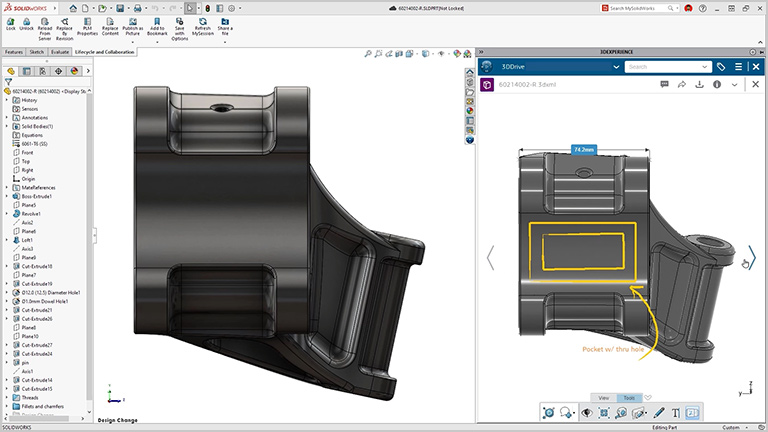
Create detailed drawings or use 3D annotations depending on your release process. Browser-based review tools help you gather clear feedback from internal teams or manufacturing partners.
Key points:
Production-ready 2D drawings
Support for GD&T and 3D annotations
Browser-based markup for faster reviews
Smoother approval cycles

SOLIDWORKS Design keeps design relationships intact through CAD-aware storage. Assemblies stay linked, file references remain valid and version history is easy to track.
Key points:
Prevent overwritten work
Maintain correct file references
Clear revision tracking
Cloud-connected access options
Choose the SOLIDWORKS Design package that matches your design workflow, engineering requirements, and level of product development complexity. SOLIDWORKS Design is available in Standard, Professional, and Premium packages, with each level adding more advanced tools for 3D CAD modelling, documentation, design validation, collaboration, manufacturing preparation, and simulation-driven engineering.

SOLIDWORKS Design Standard gives designers and engineers the core 3D CAD tools needed to create accurate parts, assemblies, and production-ready 2D drawings. It is ideal for everyday product design, concept development, modelling, documentation, design re-use, manufacturability checks, and general CAD productivity.

SOLIDWORKS Design Professional builds on SOLIDWORKS Design Standard with additional tools for design productivity, CAD standardisation, cost estimation, photorealistic rendering, automated tolerance stack-up analysis, ECAD/MCAD collaboration, and access to SOLIDWORKS Toolbox components. It is suited to teams that need stronger design validation, collaboration, and documentation control within their CAD workflow.

SOLIDWORKS Design Premium includes the capabilities of SOLIDWORKS Design Standard and Professional, with additional tools for advanced engineering workflows such as linear static analysis for parts and assemblies, time-based motion analysis, reverse engineering, electrical cable and harness routing, pipe and tube routing, duct routing, and surface flattening. It is best suited to engineering teams that need to validate performance, manage complex routed systems, and reduce design risk before manufacturing.
SOLIDWORKS Design is available in two deployment models. Both include the same CAD tools – the difference lies in how the licence is installed and accessed.

Cloud Now is licensed to the user rather than the machine. You can install the software from the cloud and access it across multiple devices, with automatic connection to Cloud Services.
Key points:
Named-user licence
Accessible across devices
Installed and updated via the cloud
Quarterly and yearly licensing options
Cloud Ready installs directly on a workstation and can be paired with optional cloud capabilities. It’s suited for fixed setups, device-based licensing and network deployments.
Key points:
Local installation on a single device
Device-based or floating licence options
Optional cloud-enabled features
Quarterly, yearly and perpetual terms available
If you are evaluating SOLIDWORKS Design solutions for product development and engineering, MECAD Systems can help you identify the right package and implementation strategy for your organisation.
Our specialists will work with you to understand your design workflow, product complexity, and collaboration requirements to ensure you implement the most effective solution.
Explore our SOLIDWORKS Customer Stories that showcase how teams in engineering, manufacturing, and product design use SOLIDWORKS Design to speed development, improve quality, and reduce costs. Each case study details the challenge, SOLIDWORKS-powered workflow, and measurable results you can replicate.


SOLIDWORKS Design is used to create 3D parts, assemblies and detailed drawings for engineering projects. It supports the full product development process – from conceptual modelling to manufacturing documentation — and is widely adopted across industries such as machinery, consumer goods, electronics, medical and research engineering. It helps teams design accurately, communicate clearly and deliver products with consistent quality.
SOLIDWORKS Design is the current product name used for the core SOLIDWORKS 3D CAD solution. It includes the tools engineers and designers use to create 3D parts, assemblies, 2D drawings and production-ready design documentation. Users who previously searched for SOLIDWORKS 3D CAD can use SOLIDWORKS Design as the relevant product page.
Yes. You can request a free trial that provides access to the modelling tools, drawing environment and cloud-enabled collaboration features. This allows you to experience the workflow and determine how SOLIDWORKS Design fits into your engineering process.
Performance depends on project size and complexity, but SOLIDWORKS Design generally benefits from strong single-core CPU performance, a certified graphics card and sufficient RAM for assemblies. MECAD can recommend hardware tailored to your workload to ensure smooth performance and reliability.
Pricing varies based on licence type and term. Both Cloud Now and Cloud Ready licences offer flexible purchase options. MECAD can provide accurate pricing and guidance to help you select the most suitable setup for your business.
Yes. The SOLIDWORKS for Startups programme provides qualifying companies with access to SOLIDWORKS Design and additional tools at no cost. The programme includes training resources and collaborative support to help early-stage hardware teams accelerate product development. MECAD can assist with eligibility checks.
SOLIDWORKS Design is known for its approachable interface and strong learning resources. It is used in thousands of educational institutions worldwide, giving students experience with industry-standard tools. Users can access structured training, certifications and community support both online and through MECAD.
No. SOLIDWORKS Design is a locally installed CAD system for Windows workstations. SOLIDWORKS xDesign is a cloud-native, browser-based tool that runs on any device. They complement each other depending on how your team works and collaborates.
SOLIDWORKS Design installs locally, but its Cloud Services allow you to share designs, manage revisions and gather feedback through cloud-connected tools. If you require a fully cloud-native CAD experience, SOLIDWORKS xDesign offers browser-based modelling with no installation required.
MECAD Systems helps engineering teams choose, implement and get value from SOLIDWORKS Design. From licence guidance and local support to structured training and workflow advice, MECAD gives users a practical path from purchase to productive use.
SOLIDWORKS Design provides the modelling accuracy, collaboration tools and documentation features needed to move ideas into production. Whether you work alone or as part of a team, it helps you design efficiently and maintain consistent quality across your projects.

