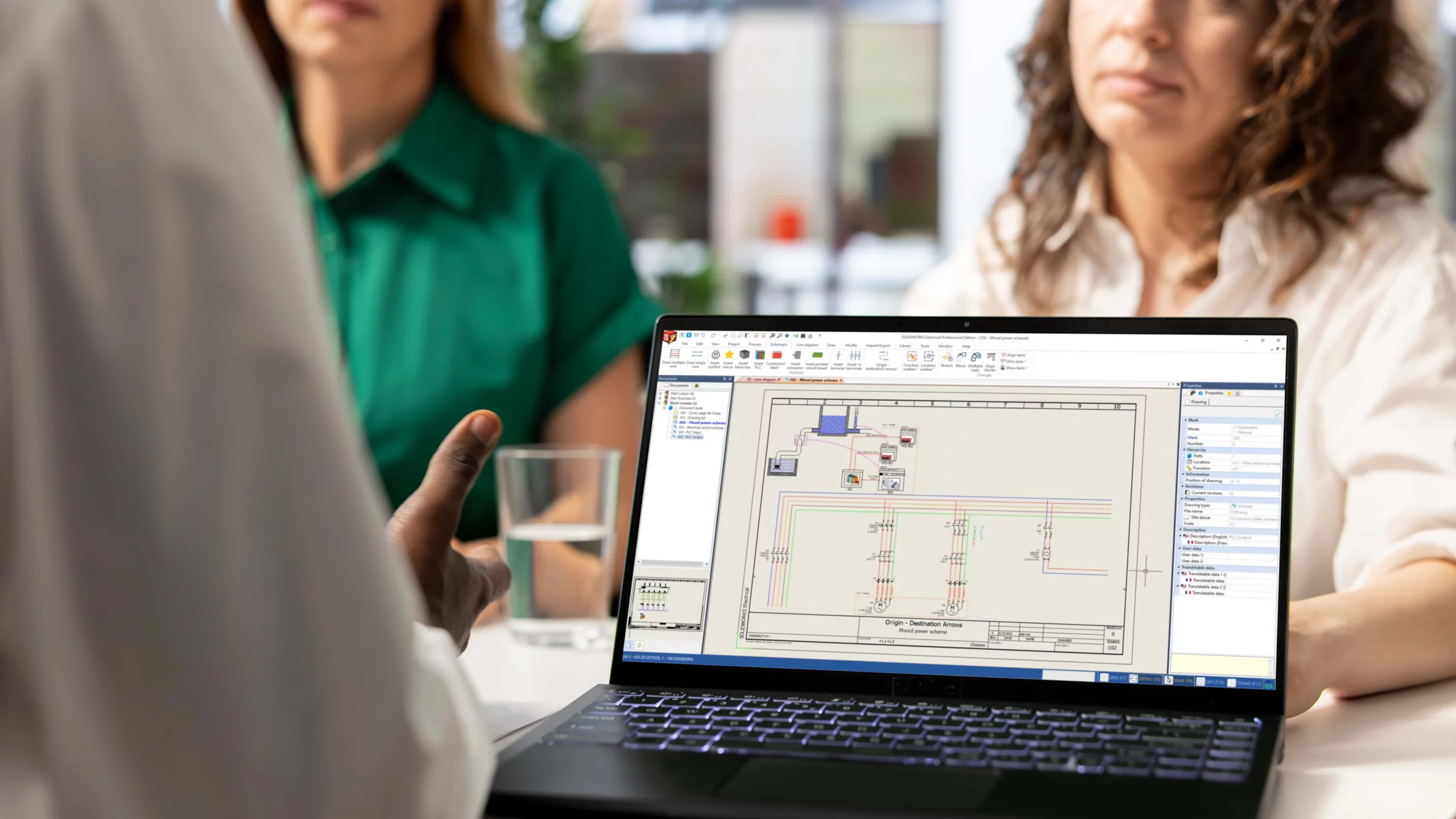
SOLIDWORKS Electrical supports electrical schematics, project data and, where needed, links to the SOLIDWORKS 3D CAD environment.
SOLIDWORKS Electrical Schematic focuses on 2D schematic design, Electrical 3D supports 3D integration, and Electrical Professional combines both.
Teams should first decide whether they mainly need schematic design, 3D electrical design or a combined electrical-to-mechanical workflow.
Symbols, component data, templates, reports, training and support should be reviewed before introducing the software into live projects.

MECAD Systems
Most design teams don’t set out to work in silos. It just happens. The mechanical engineers use one set of tools. The electrical team uses another. And somewhere between a 2D schematic and a 3D assembly, things start to fall apart. Wires don’t fit. BOMs don’t match. Panels get built with the wrong components.
Many electrical and mechanical design teams experience avoidable rework because schematic design, panel design and mechanical CAD are managed in separate systems. Small changes made in one environment often fail to make their way into the other, resulting in documentation errors, BOM discrepancies and installation issues.
In this guide, we’ll walk through what SOLIDWORKS Electrical does, how it fits into your team’s workflow, and why it’s become a go-to solution for electrical engineers, panel designers, and manufacturers across South Africa.
SOLIDWORKS Electrical is a suite of tools from Dassault Systèmes that lets engineers create intelligent electrical schematics, automate wiring documentation, and integrate electrical designs directly into 3D mechanical assemblies. It’s built for electrical engineers, control panel designers, and manufacturers who need accurate, connected electrical design within the SOLIDWORKS environment.
The suite comes in three main configurations. SOLIDWORKS Electrical Schematic focuses on 2D schematic design, including single-line and multi-line diagrams, PLC I/O, and terminal strip planning. SOLIDWORKS Electrical 3D is an add-in for SOLIDWORKS CAD that brings electrical components into the 3D model for wire routing, harness design, and spatial validation. And SOLIDWORKS Electrical Professional combines both, giving teams a unified platform where schematic data and 3D electrical design remain synchronised through a shared project database.
Typical use cases include industrial control panel design, automation systems, wiring harness layouts, and any product where electrical and mechanical systems need to work together. Whether you’re designing a control cabinet for a packaging line or routing cables through a complex assembly, SOLIDWORKS Electrical provides the tools to do it accurately. You can explore MECAD’s full range of SOLIDWORKS Electrical solutions to see which configuration suits your team.
What makes SOLIDWORKS Electrical different from general-purpose CAD tools is its intelligent, database-driven approach to electrical design.Project information is stored in a shared SQL database, allowing symbols, components, wire numbers, manufacturer data and reports to remain consistent across the project. That means when you change a wire number in one place, it updates automatically across every schematic, report, and BOM in your project. No manual edits. No hunting through drawings to check if something was missed.
Here are the features that matter most for design teams.
Automated wire numbering and circuit reuse. Tasks such as wire numbering, report generation and circuit reuse can be largely automated, reducing repetitive drafting work and helping engineers focus on design. When you duplicate a circuit, all labels and part numbers update on their own. That’s time your engineers get back for actual design work.
Manufacturer part libraries. The software includes an extensive database of electrical symbols and manufacturer-specific components. You can also import parts from the Electrical Content Portal and 3D Content Central, so your schematics reflect real-world parts with accurate specifications.
Automated BOM generation. Bills of materials, wire lists, terminal strip tables, and cut lists are generated and updated automatically as you design. There’s no need to wait until drawings are complete to produce a BOM.
Design rule checks. Custom design rules let you enforce your company’s standards across every project. The software flags violations in real time, catching errors before they reach production.
Multi-user collaboration. Multiple engineers can work on the same project at the same time. Changes from one user are visible to others, which keeps everyone aligned without the back-and-forth of emailing files.
SOLIDWORKS Electrical creates a shared, real-time design environment where electrical schematics and 3D mechanical models stay permanently connected. When your electrical engineer updates a schematic, the 3D model reflects that change instantly, and vice versa. Both teams work from a single source of truth, which eliminates version conflicts and reduces miscommunication.
This bidirectional link is what sets the platform apart. As Dassault Systèmes describes it, SOLIDWORKS Electrical 3D enables you to integrate your electrical schematic designs into your 3D product model through real-time data synchronisation. Your electrical team defines components and circuits in the schematic environment while the mechanical team validates physical fit, routing paths, and clearances in 3D. Neither team has to wait for the other.
The practical benefits are significant. Your teams can validate that a connector physically fits inside an enclosure before anyone orders parts. Wire and cable lengths are calculated directly from the 3D model, so your cut lists match reality. And because electrical and mechanical components share a unified BOM, procurement and manufacturing work from one consistent parts list. For teams looking to take this further, pairing SOLIDWORKS Electrical with SOLIDWORKS PDM for data management adds version control and workflow automation across your entire design dataset.
As Engineering.com noted in a report on electromechanical collaboration, design teams that fail to work together will produce products that lag behind the competition in both quality and time to market. SOLIDWORKS Electrical gives your team the shared environment needed to avoid that outcome.
Rework is one of the most expensive problems in product development, and much of it starts in the design phase. Research from the American Society for Quality (ASQ) found that the average cost of rework in manufacturing sits at 12.5% of product sales. The same study highlighted that fixing a design error after production can cost up to 100,000 times more than catching it during detailed design.
SOLIDWORKS Electrical attacks this problem at the source. Its database-driven design means every change propagates automatically. If you update a component in your schematic, the BOM, wire list, and 3D model all reflect that change without manual intervention. There’s no room for the kind of “forgot to update one drawing” errors that cause costly rework downstream.
The 3D integration adds another layer of protection. By routing wires and placing components inside the actual mechanical assembly, your team can spot physical clashes, bend radius violations, and clearance issues before a single prototype is built. SoftwareReviews highlights that this kind of 3D integrated design reduces development cycles and costs by catching problems that would otherwise surface during assembly or commissioning.
Real-world results back this up. Shred-Tech, an industrial shredder manufacturer, combined SOLIDWORKS Electrical Schematic with SOLIDWORKS Design and saw a 10% reduction in panel size and cut BOM generation time from five days down to roughly four hours. Velux LLC, an automation integrator, slashed schematic development time by 50% and increased automation throughput by 25% using SOLIDWORKS Electrical’s data reuse capabilities. MECAD has seen similar results locally: one client’s electrical workflow was restructured using SOLIDWORKS Electrical with consistent symbol libraries, automated BOMs, and integrated port validation, resulting in faster project turnarounds and cost reductions of over 30% in some cases.
SOLIDWORKS Electrical and AutoCAD Electrical both handle schematic design, but they take fundamentally different approaches. The biggest difference is integration. SOLIDWORKS Electrical is database-driven and natively connected to SOLIDWORKS 3D CAD, while AutoCAD Electrical is file-based and operates primarily in 2D. If your team already works in SOLIDWORKS for mechanical design, adding SOLIDWORKS Electrical creates a unified environment that AutoCAD Electrical simply can’t replicate.
On independent review platforms, both tools score well. Capterra’s user comparison gives AutoCAD Electrical a 4.6 rating for features and 4.2 for ease of use, while SOLIDWORKS Electrical Schematics scores 4.4 for features and 4.0 for ease of use. AutoCAD Electrical benefits from its large user base and extensive symbol libraries, and it’s a natural fit for teams already working in the Autodesk ecosystem.
Where SOLIDWORKS Electrical pulls ahead is in automation and 3D connectivity. Circuit reuse in SOLIDWORKS Electrical automatically updates all labels and numbering. Reports and BOMs generate themselves from the design database. And the real-time link to 3D means your electrical designs are always spatially validated against the mechanical assembly. As SoftwareWorld’s independent comparison summarises, SOLIDWORKS Electrical provides superior integration with 3D modelling, enhancing collaboration and design efficiency.
AutoCAD Electrical remains a strong option for organisations standardised on Autodesk products or those focused primarily on 2D electrical documentation. The advantage of SOLIDWORKS Electrical becomes more apparent when electrical and mechanical teams need to collaborate closely on the same product.
For teams in South Africa weighing up their options, the decision often comes down to your existing CAD environment. If you’re a SOLIDWORKS house, the integration benefits are hard to ignore. MECAD’s team can help you evaluate both options and find the right fit for your workflow.
SOLIDWORKS 2026 brings a set of targeted updates that make electrical design workflows smoother, more flexible, and better connected to mechanical design. The improvements focus on practical pain points: library management, documentation quality, and cross-discipline collaboration.
One of the standout additions is the ability to assign accessory parts like pins, sockets, seals, and plugs directly to specific terminals or circuits in 2D. This means you can create complete BOM documentation without modelling every accessory component in 3D, which saves time and improves accuracy for manufacturing handoffs.
PDF export has also been improved. You can now organise output by project, book, or page with customisable naming conventions and automatic page orientation, making it faster to produce clear production documentation.
On the collaboration side, ECAD-MCAD data exchange gets a boost through IDX 3.0. As MECAD’s detailed overview explains, teams can now track parent-child relationships and review overwritten data more clearly during cross-discipline exchanges. CircuitWorks improvements add traceability for key pins and plated/non-plated holes, which helps reduce errors during PCB integration. You can read the full breakdown in MECAD’s SOLIDWORKS 2026 Electrical updates article.
Library management also gets a welcome upgrade. Local electrical content can now be saved to a centralised library on the 3DEXPERIENCE platform, making it easier for teams to share components, eliminate duplicate work, and maintain consistency across projects.
If your team is still working with disconnected electrical and mechanical design tools, the path forward is clearer than it’s ever been. SOLIDWORKS Electrical gives you intelligent schematics, automated documentation, and real-time 3D integration in a single platform.
Here are the key takeaways from this guide. First, disconnected design tools are a major source of rework, and integrating electrical and mechanical design in one environment is the most effective way to reduce errors and speed up development. Second, automation features like circuit reuse, wire numbering, and BOM generation can save significant time on every project. Third, the 2026 release continues to improve cross-discipline collaboration with better library management and enhanced ECAD-MCAD data exchange.
MECAD Systems is South Africa’s authorised SOLIDWORKS reseller, with offices in Centurion, Cape Town, and Durban. We provide everything you need to get started: software licensing, certified SOLIDWORKS training courses (including a dedicated Electrical course), implementation support, and ongoing technical assistance. Whether you’re evaluating SOLIDWORKS Electrical for the first time or looking to optimise an existing setup, our team of qualified engineers is here to help.
Ready to see what SOLIDWORKS Electrical can do for your design team? Contact MECAD Systems to book a personalised demo or request a quote.
Share this post: