
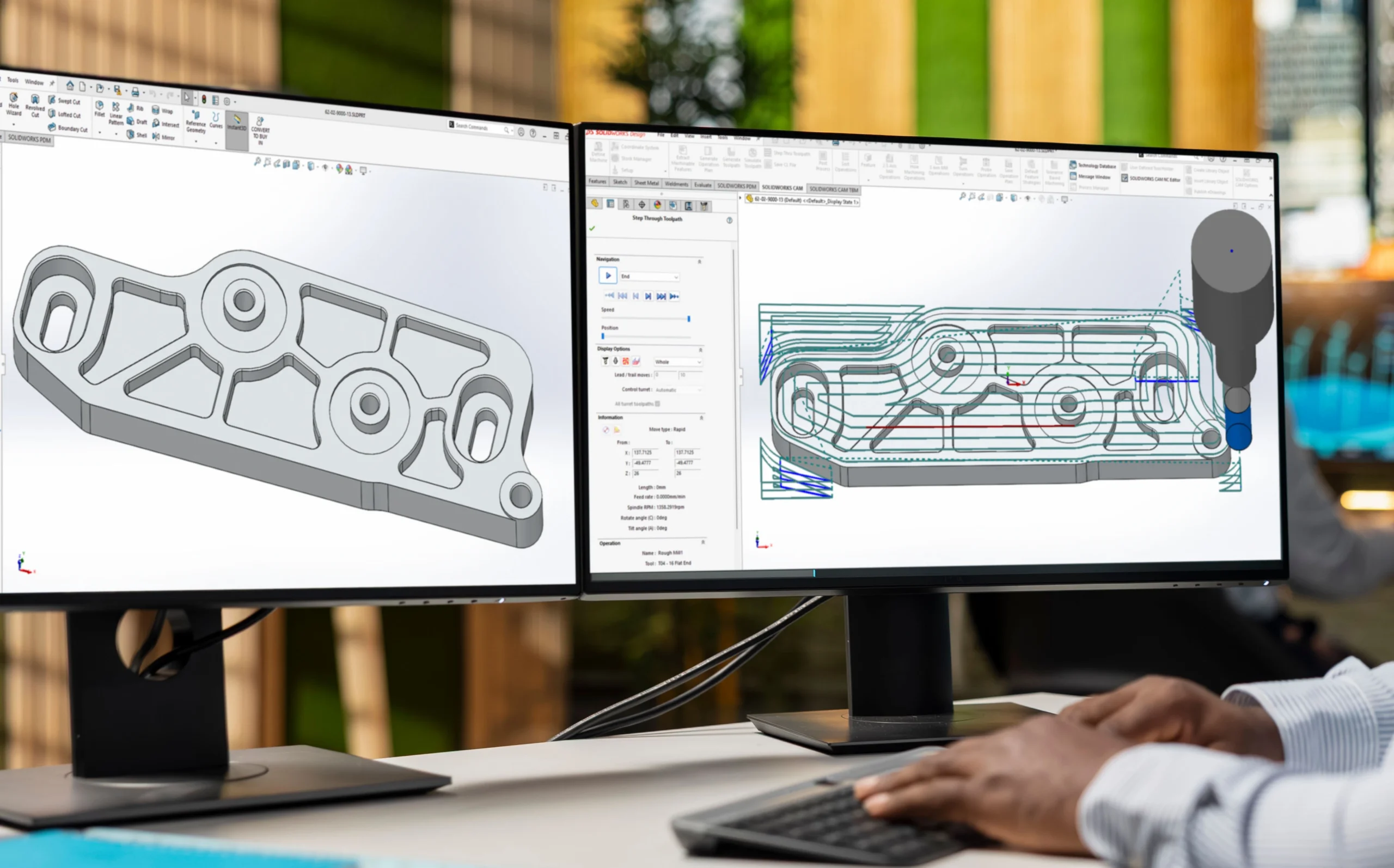
SOLIDWORKS CAM analyses 3D models to identify machinable features like pockets, holes and slots in seconds, slashing programming time.
Choosing the right roughing and finishing strategies directly impacts cycle time, tool life and surface quality.
A side-by-side comparison showed VoluMill roughing reduced machining time from 75.6 minutes to 19.5 minutes on the same operation.
SOLIDWORKS CAM Standard is included with every licence, but Professional with VoluMill is where measurable cycle-time gains begin.
Built-in toolpath simulation verifies material removal and catches collisions before NC code reaches the shop floor.

Associate Application Engineer
I regularly meet manufacturers who invest millions in CNC machines yet still struggle to reduce machining times. In many cases, the bottleneck isn’t the machine, it’s the CAM programming strategy. Choosing the wrong toolpaths can add hours to production, shorten tool life and increase costs without anyone realising it.
In this article I’ll show how SOLIDWORKS CAM Professional helps solve these problems through Automatic Feature Recognition, improved toolpath generation and VoluMill high-speed machining.
Recently we worked with a precision engineering company in Gauteng producing components for the mining industry. Their machining times had steadily increased as components became more complex. After reviewing their CAM strategies, we found much of the additional time came from conventional roughing operations rather than the machine itself. By implementing more efficient toolpaths and VoluMill where appropriate, they significantly reduced machining time while also extending cutter life.
By leveraging the capabilities available within SOLIDWORKS CAM Professional, manufacturers can improve manufacturing readiness, optimise machining processes and ensure a smoother transition from design to production.
Manufacturing readiness refers to how prepared a design is for efficient production. A model may satisfy all design requirements, but if machining considerations have not been taken into account, production challenges can quickly emerge.
Common manufacturing issues include:
SOLIDWORKS CAM helps bridge the gap between design and manufacturing by enabling machining decisions to be considered earlier in the process.
One particularly valuable capability within SOLIDWORKS CAM is the ability to automatically recognise machinable features directly from a 3D model.
Traditionally, CNC programmers would manually identify pockets, holes, slots and other machinable features before assigning machining operations. This process can become time-consuming, particularly for complex components.
SOLIDWORKS CAM simplifies this process through Automatic Feature Recognition (AFR) and the Extract Machinable Features functionality.
Using AFR, SOLIDWORKS CAM analyses the model geometry and automatically identifies features such as:
The software evaluates feature dimensions, depths and relationships to determine the most appropriate machining approach.
Once features have been recognised, SOLIDWORKS CAM references the Technology Database to assign machining strategies, cutting tools, feeds and speeds based on predefined company standards.
This allows programmers to generate an operation plan in a matter of seconds, reducing programming time while improving consistency across projects.
The video demonstrates how quickly SOLIDWORKS CAM can identify machinable features, generate operations and create toolpaths directly from the CAD model.
Many engineers are surprised to discover that SOLIDWORKS CAM Standard is already included with their CAD licence. For smaller machining jobs, the automatic feature recognition and operation planning available in Standard can eliminate many repetitive programming tasks.
When manufacturers begin chasing shorter cycle times and higher spindle utilisation, that’s typically where Professional and VoluMill start delivering measurable returns.
Toolpaths determine how a cutting tool moves through material to create the finished component. Although generating a toolpath is straightforward, creating an efficient toolpath requires careful consideration of machining strategies, tooling and machine capabilities.
A toolpath may successfully machine a component, but if it contains excessive air cutting, unnecessary rapid movements or inefficient cutter engagement, the overall production process becomes less efficient.
Optimised toolpaths can help manufacturers:
Even small improvements in toolpath strategy can deliver significant gains across an entire production schedule.
One mistake I frequently see is programmers selecting the same roughing strategy regardless of the geometry they’re machining. While it will remove material successfully, it often isn’t the most efficient approach.
The objective of roughing is to remove material as efficiently as possible. Traditional roughing methods often generate varying cutter loads, resulting in increased vibration, excessive tool wear and longer cycle times.
Modern roughing strategies focus on maintaining consistent cutting conditions and reducing sudden changes in cutter engagement.
Benefits include:
Finishing operations focus on achieving dimensional accuracy and surface finish quality.
Selecting the correct finishing strategy can reduce secondary operations, improve quality and ensure the final component meets customer specifications.
One of the most significant productivity improvements available within SOLIDWORKS CAM Professional is the integration of VoluMill high-speed machining technology.
Traditional roughing operations often generate toolpaths with sharp directional changes and varying cutter engagement. As the cutter enters corners or narrow sections, the cutting load increases significantly. To prevent excessive tool wear, feed rates are often reduced, increasing machining time.
VoluMill addresses this challenge by generating intelligent toolpaths that maintain a consistent cutter engagement throughout the operation. Rather than forcing the tool through abrupt directional changes, the toolpath follows smooth, flowing movements that keep cutter loading more consistent.
The result is:
To demonstrate the impact of VoluMill, the same pocketing operation was programmed using both a conventional roughing strategy and a VoluMill roughing strategy.
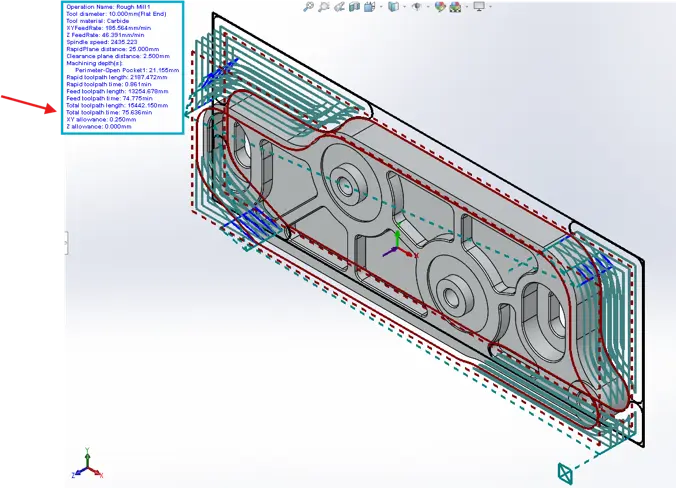
The conventional toolpath follows a traditional offset pattern with multiple directional changes and areas where the machine must slow down before changing direction. These movements increase machining time and create inconsistent cutter loading.
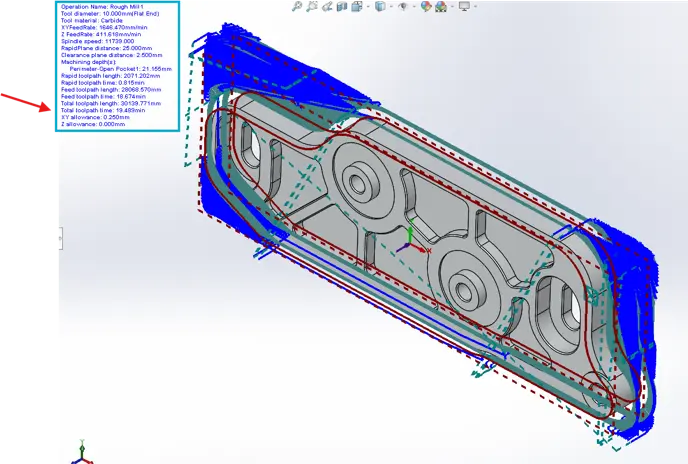
The VoluMill toolpath uses smooth, continuous movements that minimise sharp corners and maintain a constant engagement angle between the cutter and material. This allows the machine to maintain higher feed rates while reducing sudden tool loading.
| Strategy | Total Toolpath Time |
| Conventional Roughing | 75.636 min |
| Strategy | Total Toolpath Time |
| VoluMill Roughing | 19.489 min |
Using VoluMill reduced the machining time by 56.147 minutes, representing an approximately 74% reduction in machining time for the same roughing operation.
Beyond the significant reduction in cycle time, the VoluMill toolpath is noticeably more efficient. The smooth, flowing toolpath minimises abrupt directional changes and maintains a more consistent cutter engagement with the material. This allows the machine to sustain higher feed rates, reduces unnecessary deceleration, and places less stress on both the cutting tool and spindle.
For manufacturers running multiple jobs per day, these savings can translate directly into increased machine utilisation, lower production costs and faster project delivery.
VoluMill is exclusively available within SOLIDWORKS CAM Professional, providing users with access to advanced high-speed roughing capabilities that are not available in the Standard version.
Once machining operations and toolpaths have been generated, SOLIDWORKS CAM’s built-in simulation tools allow programmers to validate the machining process before production begins.
The simulation environment enables users to visualise tool movement, verify material removal and identify potential issues such as collisions, excessive air cutting or inefficient machining sequences.
For manufacturers looking to improve manufacturing readiness, simulation acts as the final verification step before NC code is sent to the machine.
Manufacturing readiness begins long before a part reaches the CNC machine. Effective toolpath creation and machining strategy selection play a critical role in determining productivity, quality and overall manufacturing success.
By leveraging capabilities such as Extract Machinable Features, Automatic Feature Recognition, simulation tools and advanced roughing strategies like VoluMill, manufacturers can reduce programming time, improve machining efficiency and minimise shop floor issues.
From my experience working with South African manufacturers, businesses that invest time in optimising their CAM programming processes consistently achieve better production outcomes. SOLIDWORKS CAM Professional provides the tools needed to bridge the gap between design and manufacturing, helping organisations move from concept to production with greater confidence, efficiency and profitability.
If you’re unsure whether your current machining strategies are making full use of SOLIDWORKS CAM Professional, the MECAD Applications Engineering team can review your workflow and demonstrate where improvements may be possible.
Share this post:




