
 SOLIDWORKS Certified Gold Product
Geomagic for SOLIDWORKS gives engineers and designers a direct path from 3D scan data to usable CAD models, all within the familiar SOLIDWORKS environment. Scan or import point clouds and mesh data, process and refine the results, and rebuild accurate solid parts without leaving your SOLIDWORKS workspace.
Geomagic for SOLIDWORKS is the industry’s most complete integrated scan-to-SOLIDWORKS solution. Developed by Hexagon and certified as a SOLIDWORKS Gold Product, it lets you scan or import scan data directly into SOLIDWORKS and build complex 3D models of real-world objects.
The software plugs directly into your SOLIDWORKS environment, giving you advanced tools to make point clouds and polygons usable in your design process. It supports a range of 3D scanners as well as standard point and polygon file formats, including colour point data. Advanced, automated wizards create accurate sketches, surfaces, and feature-based editable solid parts inside SOLIDWORKS.
Key capabilities include:
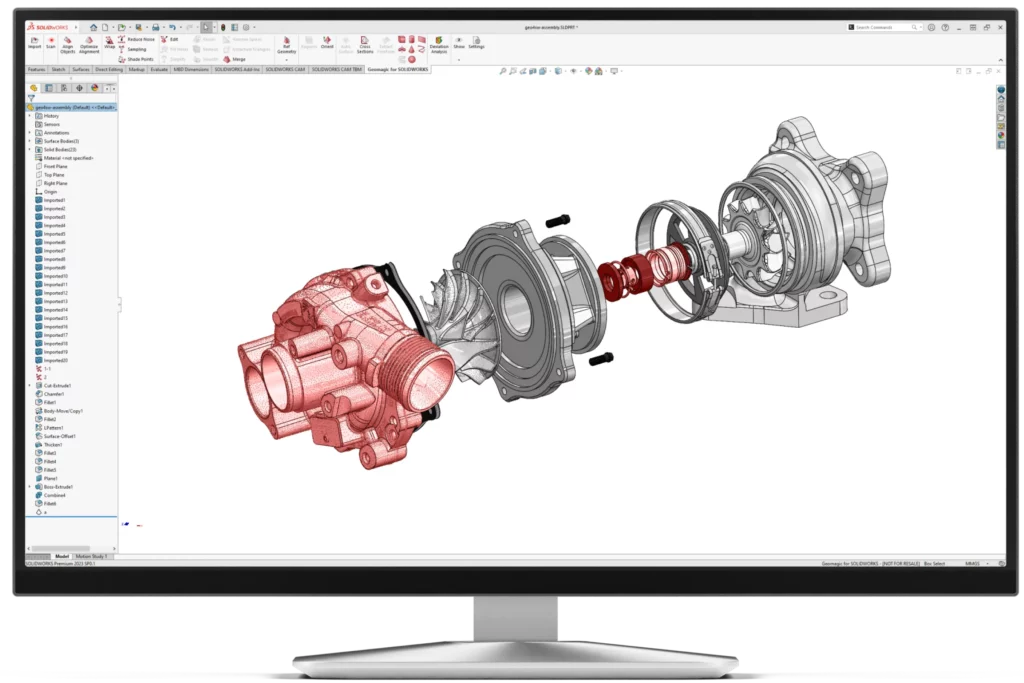
Geomagic for SOLIDWORKS reduces the complexity of reverse engineering by keeping every step inside a single, familiar design environment. Teams can move from physical part to production-ready CAD faster, with fewer errors and less manual rework.
Geomagic for SOLIDWORKS provides a comprehensive set of tools for handling every stage of the scan-to-CAD process. From scanner connection and data import through to feature extraction and accuracy verification, every capability runs directly inside SOLIDWORKS.
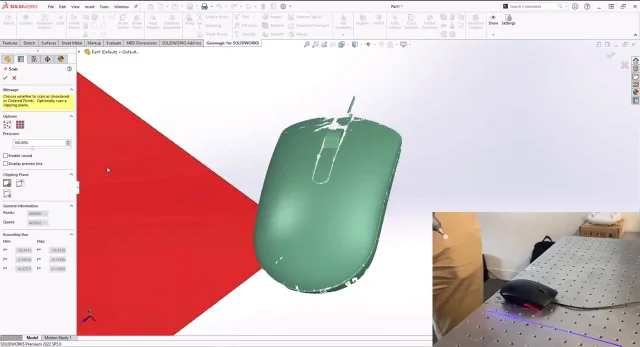
Scan or probe features and sketches directly inside SOLIDWORKS. Supported hardware includes Hexagon Scan Arms, Creaform Handheld Scanners, Artec Handheld Scanners (via Artec Studio), Faro Scan Arms and Cobalt Array Imager, and Nikon Scan Arms. Both non-contact scanning and contact probing are supported, including colour 3D scanning with compatible devices.
Key points:
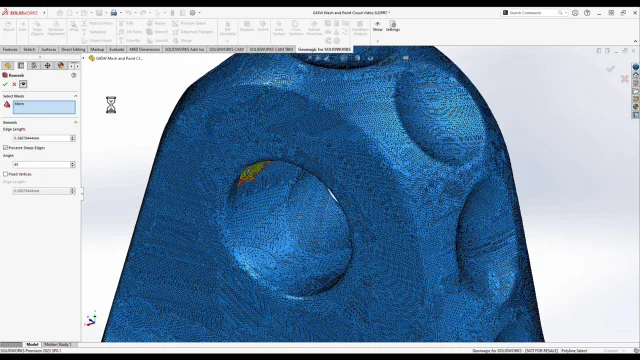
Fast, automated point cloud processing and polygon tools for cleaning and refining mesh data. Includes polygonal surface creation from point cloud or merging of multiple meshes, along with powerful alignment tools for probe device alignment, World Coordinate System alignment, and picked point alignment.
Key points:
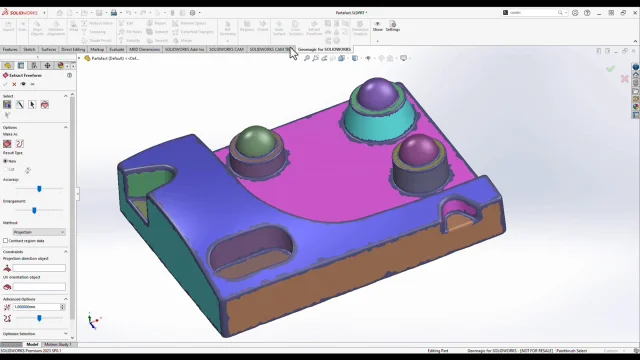
Automatic surfacing converts both organic and geometric objects into CAD solids. Smart selection tools extract features directly from scan data (extrude, freeform surface, revolve, primitive feature fitting, sweep, pipe). Cross-sectioning creates automatic curves and sketches. Region grouping tools provide detailed mesh segmentation for intelligent feature extraction.
Key points:

Compare mesh or point cloud objects against CAD objects at any time during modelling. Every wizard includes a built-in deviation analysis tool. Colour-mapped deviation plots highlight areas where the model differs from the scan, giving clear visual feedback on accuracy.
Key points:
| Feature | Description |
|---|---|
| Direct Scanner Integration |
Scan or probe features and sketches directly inside SOLIDWORKS. Supported hardware includes:
|
| Colour Scanning and File Import |
|
| Point Cloud Processing | Fast, automated processing of point cloud data. |
| Polygonal Surface Creation | Mesh construction from point cloud or merging of multiple meshes. |
| Polygon Processing Tools |
|
| Powerful Alignment Tools |
|
| Automatic Surfacing | Automatic conversion of both organic and geometric objects to CAD solid. |
| Mesh and Point Cloud Cross Sectioning | Automatic curve and sketch creations. |
| Smart Selection Tools from Scan Data | Extrude, freeform surface, revolve, primitive feature fitting, sweep, and pipe. |
| Smart Selection Tools for Polygon Groups | Region, box, lasso, polygon, paint bucket. |
| Region Grouping Tools | Pre-processing step for intelligent feature extraction and detailed mesh segmentation. |
| 3D Comparison with Deviation Analysis | Compare at any time between mesh and point cloud object and CAD object. |
If you are evaluating Geomagic for SOLIDWORKS for reverse engineering, scan-based design, or scan-to-CAD workflows, MECAD Systems can help you identify the right configuration and implementation approach for your organisation.
Our specialists will work with you to understand your scanning hardware, reverse engineering requirements, and design workflows to ensure you get the most effective solution.
Geomagic for SOLIDWORKS is a plug-in from Hexagon that adds reverse engineering and scan processing capabilities directly inside SOLIDWORKS. It is a SOLIDWORKS Certified Gold Product. The software lets you import 3D scan data (point clouds and meshes), process and refine that data, and use automated wizards to create accurate sketches, surfaces, and feature-based editable solid parts. Because it runs within SOLIDWORKS, you don’t need a separate application to go from scan to finished CAD model.
Geomagic for SOLIDWORKS supports direct integration with Hexagon Scan Arms, Creaform Handheld Scanners, Artec Handheld Scanners (via Artec Studio), Faro Scan Arms and Cobalt Array Imager, and Nikon Scan Arms. It also supports the import of standard point and polygon file formats, so you can work with scan data from virtually any 3D scanner on the market. Devices that support colour capture can scan colour information directly into SOLIDWORKS.
The minimum requirements include Windows 8.1 or later (64-bit), an Intel or AMD processor with a minimum clock speed of 2.0 GHz, 8 GB RAM, 30 GB of available hard-disc space (additional space may be needed for cache), a 32-bit true colour display with a resolution of at least 1280×960, and an Nvidia Quadro graphics card. Geomagic for SOLIDWORKS is compatible with SOLIDWORKS 2019 through to SOLIDWORKS 2025. Full system requirements are available on Hexagon’s support site.
Geomagic for SOLIDWORKS supports English, Chinese, Japanese, Korean, German, Italian, Portuguese, Spanish, Polish, Turkish, French, and Czech.
You can request a demo by filling in the contact form on this page, or by getting in touch with the MECAD Systems team directly. Our specialists can walk you through the software, discuss your scanning hardware and reverse engineering requirements, and help you evaluate whether Geomagic for SOLIDWORKS is the right fit for your workflow.
Hexagon offers standalone Geomagic Wrap perpetual licences and maintenance programs for both commercial and educational use. The Geomagic Maintenance Program provides access to the latest software updates and regional support. Contact MECAD Systems to discuss the licensing options available for your organisation, including enterprise suite configurations.
Yes. Geomagic for SOLIDWORKS supports colour scanning with devices that capture colour information. You can directly scan and process colour 3D data inside SOLIDWORKS. Additionally, you can import scan files with vertex colours or texture-mapped colour data.
Geomagic for SOLIDWORKS handles both geometric and organic shapes. Typical use cases include recovering design data from legacy parts with no drawings, recreating worn or broken moulds, building components that need to fit perfectly with existing products, and capturing complex geometry that cannot be measured with traditional hand tools. The combination of automatic surfacing and guided feature extraction makes it possible to scan virtually anything and create a manufacturing-ready design.
Geomagic for SOLIDWORKS brings scan-to-CAD reverse engineering directly into your SOLIDWORKS environment. Whether you’re recovering legacy parts, designing around existing components, or capturing complex geometry, it gives you a complete, integrated workflow from 3D scan to finished solid model.