
 Trusted by millions of engineers and designers worldwide
SOLIDWORKS Flow Simulation gives engineers powerful Computational Fluid Dynamics (CFD) analysis tools directly inside SOLIDWORKS. It helps teams simulate how liquids and gases move through and around their designs, check heat transfer behaviour, and calculate fluid forces – so they can improve product performance early in the design process and cut down on costly physical prototypes.
SOLIDWORKS Flow Simulation is a fluid flow analysis tool built into SOLIDWORKS Design. It uses a method called Computational Fluid Dynamics (CFD) to show how liquids and gases behave inside or around a product. Engineers can see where air flows, how heat spreads, and where pressure builds up – all without leaving SOLIDWORKS or exporting files to other software.
The tool supports a wide range of studies, from basic airflow checks to detailed heat transfer analysis. Engineers can run “what-if” tests by changing the shape, size, or material of a part and quickly seeing how those changes affect flow and temperature. This makes it easier to find and fix problems during design, before building a physical prototype.
Key capabilities include:
SOLIDWORKS Flow Simulation helps teams make better design choices by testing flow and heat behaviour early. Engineers can spot problems sooner, reduce the need for physical testing, and feel more confident that their products will perform as expected.
SOLIDWORKS Flow Simulation includes a range of tools for testing fluid flow, heat transfer, and related effects during product design. The level of analysis available depends on whether optional add-on modules (HVAC or Electronics Cooling) are included.
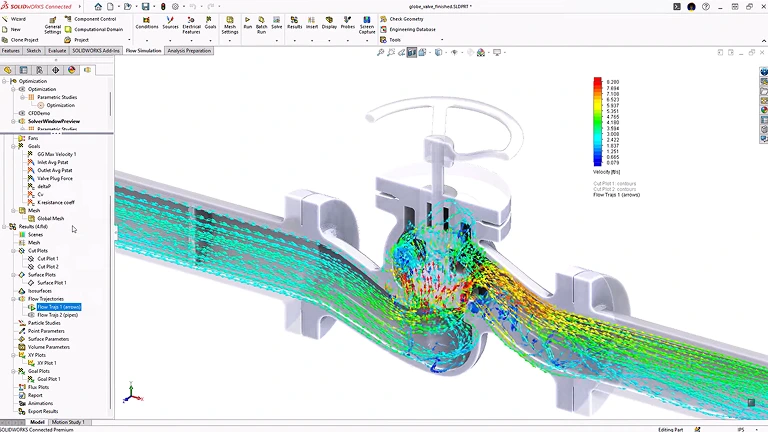
Test how fluids move through enclosed spaces like pipes, valves, and ducts – or around the outside of a product, such as air flowing over a vehicle body or around an enclosure. Both internal and external studies can be combined to get a full picture of how a product interacts with the fluids around it.
Key points:
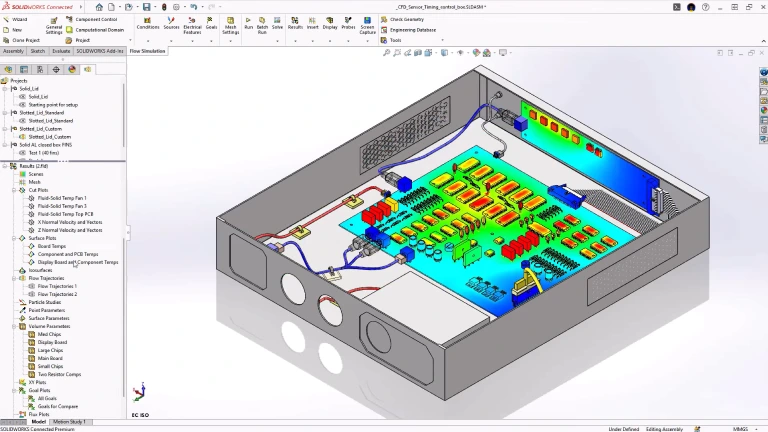
See how heat moves through solids and fluids at the same time. SOLIDWORKS Flow Simulation models convection (heat carried by moving fluid), conduction (heat moving through solid material), and radiation (heat transferred through space). This helps engineers understand temperature patterns across parts and assemblies, and make better decisions about cooling, insulation, and material choice.
Key points:
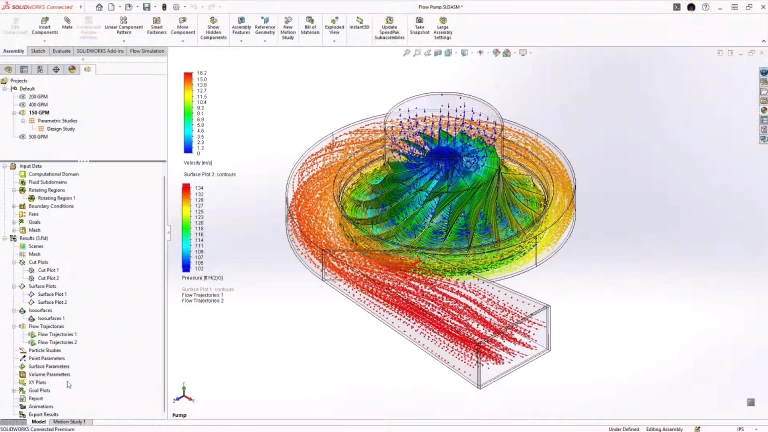
Test how rotating parts like fans, impellers, blowers, and pumps affect fluid flow. The rotating region feature lets engineers see flow patterns, pressure changes, and energy transfer caused by spinning components – helping to fine-tune equipment that moves air, water, or other fluids.
Key points:
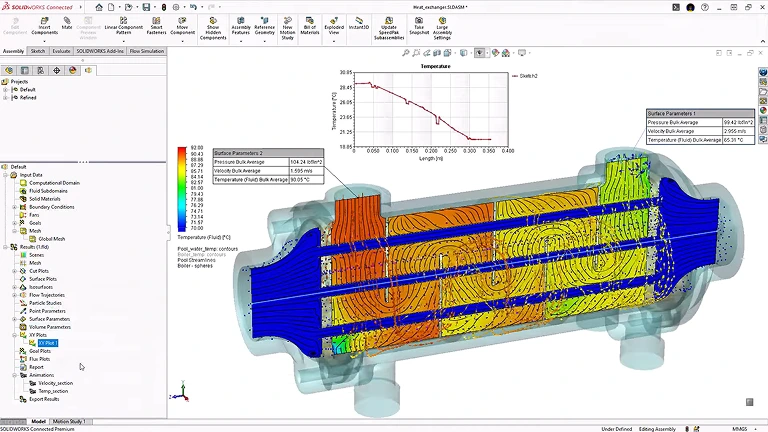
Run studies that change design inputs – like shape, size, or operating conditions – and compare the results to find the best option. Design of Experiments (DOE) studies test many combinations at once, while optimisation studies home in on the configuration that meets specific performance targets.
Key points:
SOLIDWORKS Flow Simulation is available as a base product with two optional add-on modules for specific industries. Which package you need depends on the type of flow and thermal analysis your team performs, and whether you need specialised tools for HVAC or electronics cooling.
See how engineering teams use SOLIDWORKS Flow Simulation to test flow behaviour, improve cooling performance, and cut down on physical testing. Our SOLIDWORKS Customer stories show real-world examples of how CFD-based decisions help teams get better results – from early design through to production.


If you are looking at SOLIDWORKS Flow Simulation for fluid flow analysis, cooling design, or thermal testing, MECAD Systems can help you find the right package and setup for your team.
Our specialists will take the time to understand your design process, engineering challenges, and analysis needs – so you end up with the right CFD solution for your workflow.
SOLIDWORKS Flow Simulation is a fluid flow analysis tool. It lets engineers and designers test how liquids and gases behave inside or around their products – before building a physical prototype.
To run a study, you set up conditions like fluid type, inlet speed, pressure, and temperature. The software then calculates how the fluid moves through or around your design, and shows results like flow speed, pressure, temperature, and flow paths. This helps teams find problems – such as blocked airflow, overheating, or pressure loss – and fix them during the design phase, saving time and money.
SOLIDWORKS Flow Simulation covers a wide range of fluid and thermal studies, including:
Together, these tools cover everything from simple airflow checks to detailed thermal and fluid system analysis.
Without simulation, teams often need to build several physical prototypes to test how fluids flow, how well cooling works, and where pressure builds up. SOLIDWORKS Flow Simulation lets engineers run these same tests on their 3D models – virtually. By finding problems like poor airflow, overheating, or pressure loss during the design phase, teams can make fixes before any parts are manufactured. This means fewer prototype rounds, lower material costs, and shorter development timelines.
SOLIDWORKS Flow Simulation is the core product. It handles internal and external flow analysis, heat transfer, rotating equipment, free surface modelling, and design studies.
The HVAC Module is an optional add-on that builds on top of Flow Simulation. It adds tools made specifically for heating, ventilation, and air conditioning work – including advanced radiation modelling for materials like glass, tracer studies for tracking pollutants and contaminants, human comfort measurements (such as temperature comfort and draft), air quality indices, and an expanded database of HVAC components and building materials.
The Electronics Cooling Module is an optional add-on for Flow Simulation, built for engineers who design electronic products. It adds tools for modelling printed circuit boards (PCBs) with realistic heat flow, chip package representations, heat pipes, thermoelectric coolers, and the heat generated by electric current (Joule heating). It also comes with an expanded database of thermal data for common electronic parts. This module is a good fit for teams working on thermal management for devices like servers, consumer electronics, or any product where keeping components cool is critical.
No. SOLIDWORKS Flow Simulation is designed for everyday engineers and designers who already work in SOLIDWORKS. A step-by-step setup wizard guides you through the process of defining your fluid, setting boundary conditions, and choosing what results to track. The software handles meshing and turbulence modelling automatically. While knowing the basics of fluid flow and heat transfer will help you read results more confidently, you do not need specialist CFD training to get started.
Yes. You can send pressure and temperature results from Flow Simulation directly into SOLIDWORKS Simulation for structural analysis. This lets you see how fluid forces and heat affect the strength and shape of your parts. For example, if a pipe carries hot, pressurised fluid, you can first simulate the flow to get temperature and pressure data, then use that data to check whether the pipe can handle the load. This is especially useful for pressure vessels, heat exchangers, and piping systems.
Flow Simulation works with many different fluid types, including regular gases (like air), real gases, standard liquids (like water), compressible liquids, non-Newtonian fluids (like oil, blood, or sauce), and steam. The software comes with a built-in database of common fluids, and you can add your own custom fluids if needed. It also supports studies that involve more than one type of fluid at the same time.
SOLIDWORKS Flow Simulation is used across many industries. Common examples include automotive (aerodynamics, engine cooling, cabin airflow), electronics (thermal management, device cooling), industrial equipment (pumps, valves, compressors), consumer products (appliance airflow, heating), HVAC and building services (duct design, indoor comfort), aerospace (aerodynamics, internal cooling), and medical devices (fluid delivery, equipment cooling). Any product where fluid flow, airflow, or heat transfer matters can benefit from this tool.
Yes. SOLIDWORKS Flow Simulation needs its own licence on top of a SOLIDWORKS CAD licence. It works with all levels of SOLIDWORKS – Standard, Professional, and Premium. The HVAC Module and Electronics Cooling Module are additional add-ons that require Flow Simulation as a starting point. Flow Simulation is available as a perpetual licence (with a subscription for updates and support) or as a term licence (paid on a set schedule). Contact MECAD Systems for pricing and licensing details.
SOLIDWORKS Flow Simulation gives engineering teams the tools to test fluid flow, heat transfer, and fluid forces during the design process. Whether you need to check airflow through a housing, manage heat in an electronic device, or test aerodynamic performance, Flow Simulation helps you make better design decisions – while cutting down on costly physical prototypes.